Introduction to GST Registration
Businesses whose revenue exceeds Rs. 40 lakhs * (Rs 10 lakhs for NE and hill states) are expected to register as a regular taxable individual under the GST Regime. This registration process is called the GST registration process.
Registration under the GST is compulsory for some firms. If the organization carries on business without registration under the GST, it will be an offense under the GST and severe penalties will apply.
Registration for GST normally takes from 2-6 working days. We'll help you with 3 quick steps to register for GST.
* CBIC told that threshold turnover had risen from Rs 20 lakhs to Rs 40 lakhs. The notice will take effect as from 1 April 2019..
- Individuals registered under the Pre-GST law (i.e., Excise, VAT, Service Tax etc.)
- Businesses with turnover above the threshold limit of Rs. 40 Lakhs* (Rs. 10 Lakhs for North-Eastern States, J&K, Himachal Pradesh and Uttarakhand)
- Casual taxable person / Non-Resident taxable person
- Agents of a supplier & Input service distributor
- Those paying tax under the reverse charge mechanism
- Person who supplies via e-commerce aggregator
- Every e-commerce aggregator
- Person supplying online information and database access or retrieval services from a place outside India to a person in India, other than a registered taxable person
*CBIC has notified the increase in threshold turnover from Rs 20 lakhs to Rs 40 lakhs. The notification will come into effect from 1st April 2019.
When registering to be a part of the GST bracket you will need to present your Pan Card, Business incorporation certificate/Business partnership bond, Pan Card / Aadhar Card of the partner, Address proof and Bank statements of the company that is attempting to be registered. You can either take these documents and head to the GST Seva Kendra or you can opt to register via the government-based online GST portal itself –
Step 1 – Go to gst.gov.in GST portal and navigate the Services, after which you can click on registration.
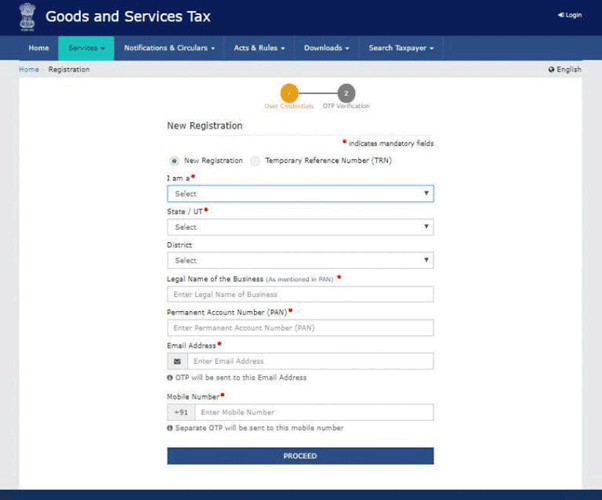
Step 2 – From the ‘I am a’ drop-down menu, select the taxpayer option.
Step 3 – Fill the GST reg 01 form to complete your new registration. Enter accurate information for all fields, especially for a legal business name, state of operation, email address and mobile number for contact and then PAN card for verification purposes.
Step 4 – To verify that your contact information is correct, send an OTP (one-time-password) to your email and mobile number. Click on proceed after verifying the same.
Step 5 – Part A ends here and you will receive a Temporary Reference Number (TRN).
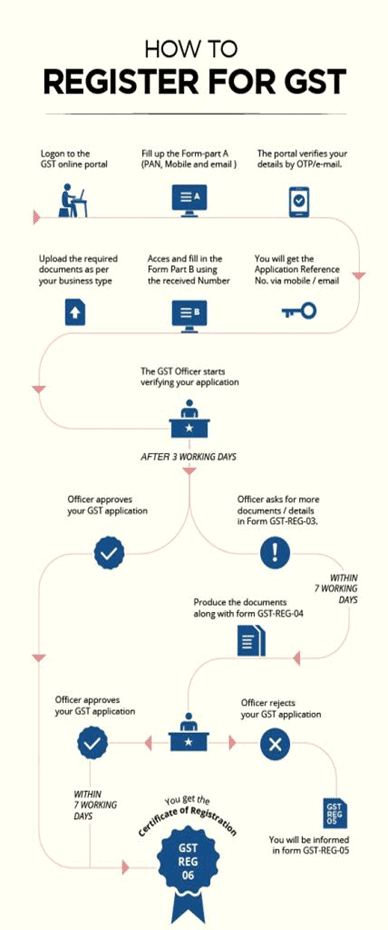
Step 6 – To begin filling in part B you need to log in with the TRN you generated in step 5. Once again complete the OTP verification process, after which you will be redirected to the page where you can fill in relevant GST registration information.
Step 7 – Mention any existing registrations, if at all. Populate the fields with accurate information pertaining to your business name, state of operation, date of commencement and PAN number.
Step 8 – Submit information of approximately 10 partners or collaborators within your business. If you are making use of a proprietorship firm then submit personal information, DIN (Director Identification Number), PAN, etc.
Step 9 – Declare all information of the individual who is authorized to file your GST returns.
Step 10 – Indicate the principal location of the business, address, official contacts, and type of premises possession that has been successfully acquired.
Step 11 – Upload any relevant documentation that is based on the business-type that is being registered.
Step 12 – Click on save and continue. Sign the application digitally. Click on submit.
Step 13 – If you have submitted the form successfully then you will receive an ARN (Application Reference Number) either via email or a text message and this will confirm details regarding your registration.
An offender who does not pay tax or make short payments (genuine errors) must pay a fine of 10 percent of the tax sum owed equal to at least Rs.10,000.
The fine shall be at 100% of the tax due when the defendant has intentionally evaded tax payment
Make your first invoice today — It’s free!
To Download GST software online visit: www.billingsoftwareindia.in